Palette Picker
Palette Picker is a Windows desktop application for choosing colours and putting together colour palettes, which can then be saved to be used later and shared with others.
Install
The latest release is version 1.12.0, released on 16 August 2026.
You can also install using WinGet:
winget install MarkEmbling.PalettePicker
Or using Scoop:
scoop bucket add markembling https://github.com/markembling/scoop-bucket
scoop install markembling/palette-picker
All releases can be found on the Palette Picker releases page.
Features
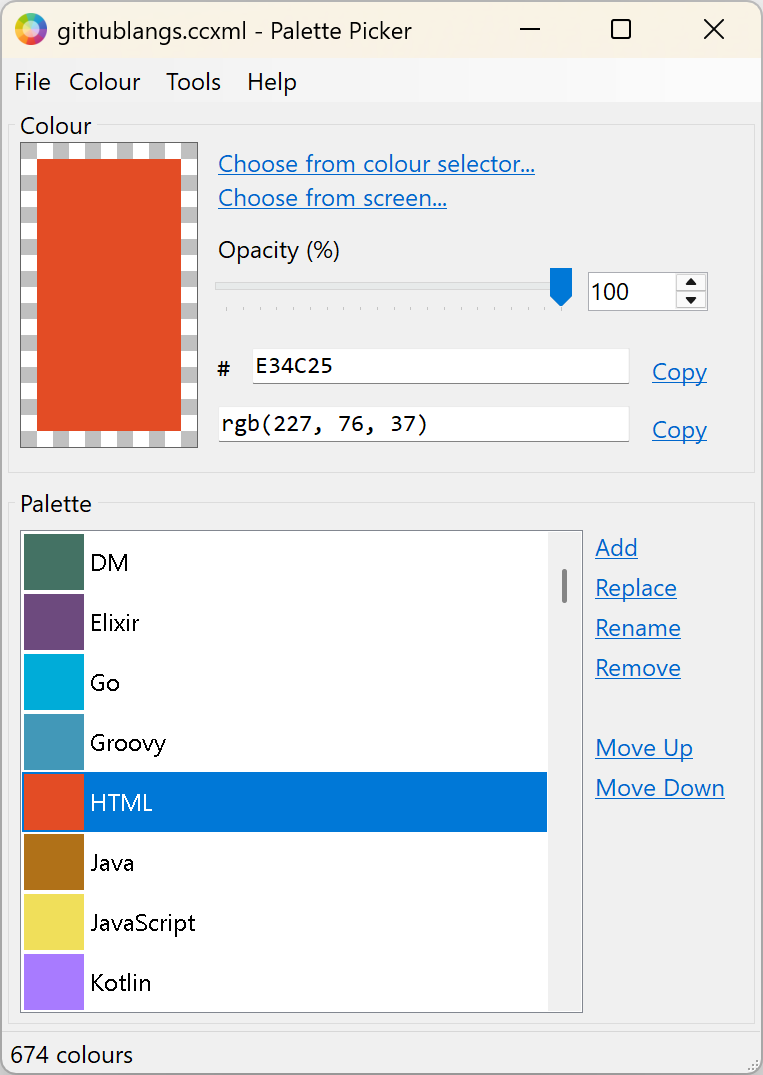
For colour selection, it provides the ability to choose a colour using the standard Windows colour picker and the ability to choose directly from the screen. The colour's opacity is also adjustable. Colour values can be copied out as hex RGB (#7DACBF) or in CSS RGB form (rgb(125, 172, 191)). You can also type in either of the colour boxes to update the colour by value.
It also provides a number of other colour features:
- Lightening or darkening the colour.
- Inverting the colour.
- Generating a random colour.
- Checking the contrast of a colour against black, white, or any other colour in the current palette. This is mainly intended for accessibility (WCAG) checking.
Colours can be added to a palette which can then be saved to a file for later use and sharing within teams. The palette-related features include:
- Giving names to colours.
- Updating and renaming colours in the palette.
- Re-ordering colours within a palette.
- Importing and exporting palettes in a number of different formats.
Migrating from Colour Chooser
If you have previously used Colour Chooser, this is a direct upgrade. You can use Palette Picker in exactly the same way as Colour Chooser and all your previous palette files will work just as before.
If you previously used the installer, installing Palette Picker will replace Colour Chooser.
Scoop does not support updates where the name has changed so if you previously installed Colour Chooser using Scoop, you will need to uninstall it and then install Palette Picker.
Known Limitations
- When picking a colour from the screen, the mouse cursor doesn't change. It will capture the colour from the cursor's hotspot but the specific shape of the cursor will be dependent on the content beneath it.
- If the choose from screen option is disabled, it is probably because the application is running with too little trust. This could happen if the file needs unblocking or is running from an untrusted location.
- The setup file is not signed so Windows SmartScreen might initially block the file with a warning. Unfortunately code-signing certificates which would help with this are prohibitively expensive for a free tool like this.
If you run into any other problems or unexpected issues, let me know.