Skip to content

Mark Embling

Blog

Git Server: Gitosis and Cygwin on Windows

Git is arguably the latest and greatest SCM tool available - my latest tool of choice in place of the old favourite Subversion, and as such have decided to move to using it for my personal projects. In addition, we have decided to use it at work, where we run operate using a mainly-Windows environent. This lead me on to setting up a Git server on Windows. This was achieved using Cygwin and plain old SSH/Git. This serves us fine for our needs, but a comment on twitter got me thinking - can Gitosis be used under Cygwin for a slicker experience. The answer is yes, and this post will explain how.

Assumptions

This post assumes the reader is familiar with git and is comfortable with the command line (in particular bash). It also makes the assumption that the user is familiar with OpenSSH and its public/private key system. This procedure was tested using a Windows Server 2003 VM, but I foresee little difficulty in following the same procedure in other Windows versions. Do comment if this is not the case. At the time of writing, Cygwin 1.5.25-15 was the latest version.

Gitosis?

Gitosis is a tool written in python designed to make hosting git repositories easier and more secure. Instead of requiring user acounts on the server machine with shell access, it operates under a single user account and uses SSH keys to differentiate users, and grants/denies access to a set of repositories based upon a configuration file.

It was primarily designed for use on Unix-like operating systems (and works very well on my Ubuntu-based server) but as yet I have seen very little mention of it used on Windows.

Garry Dolley has a very good tutorial for setting up gitosis on a Ubuntu machine on scie.nti.st and it should apply with little modification to most other linux/unix-like operating systems as well. It was this tutorial which served as reference during my gitosis exploits.

Installing Cygwin

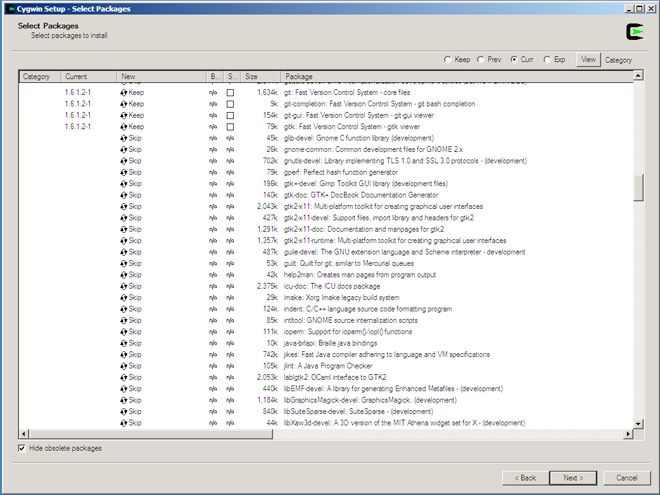
Cygwin can be obtained from their website and consists of a setup application which requires an internet connection in order to download the packages for installation. Installing Cygwin is a fairly straightforward affair, with a fairly standard graphical setup wizard. Choose the 'Install from Internet' method and install with all the defaults, making sure Cygwin is installed for all users as the SSH service will not run as your user account. Pick any download mirror which works (sometimes not all do), and you will be given a large list of packages.

In order to install all the tools needed, select the following packages by clicking on the word 'Skip' to change it to the latest version number. Further clicks will cycle through previous versions and back to 'Skip' again. Its probably best to stick with all the latest versions.

  • git (in the 'Devel' category)
  • openssh (in the 'Net' category)
  • python (in the 'Python' category)

This should be all that is required on top of the defaults. Of course, there are many more and feel free to choose those which apply to you. You can come back later and install/remove additional packages if the need arises.

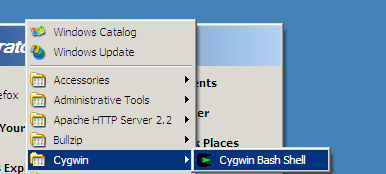
Once the installation completes, you should have an entry in the Start menu and/or on the desktop for the Cygwin Bash Shell.
Setting up SSH

Now that Cygwin is installed, we can use it to set up SSH as a service. This will be what we use to pull from and push to our git repositories later.

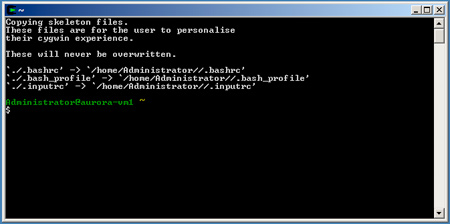
Fire up the newly installed git bash shell. If you are used to linux or unix, this will be a familiar sight - the bash shell.
Before setting the SSH service up, we must make a tweak to some privileges. Apparently this is a problem with newer Cygwin releases (from here). Run the following commands:

chmod +r /etc/passwd
chmod u+w /etc/passwd
chmod +r /etc/group
chmod 755 /var

In order to get the SSH service set up, type ssh-host-config, and answer yes to the question "Should privilege separation be used?" In addition, answer yes when asked whether a new local account called 'sshd' should be created, and to whether sshd should be installed as a service. When prompted for the value of the 'CYGWIN' environment variable, accept the default by hitting enter, and answer no to whether you wish to use a different username to the default for the account for running the service, and then answer yes to whether the user account 'cyg_server' should be created. You will be asked for a password for the new user - enter your choice of password here. This is just to protect the user account from unauthorised access, since it will have local administrator privileges. If all goes well, your user account will be created and the service will be set up.
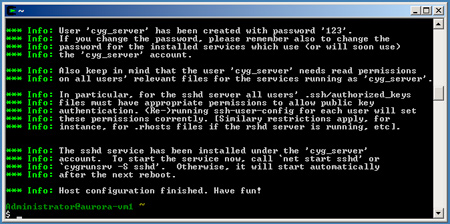
As stated in the success message, we can now crack on by starting the SSH service Cygwin has installed with us. Run net start sshd to get it going.

Installing Python Setuptools

Before installing gitosis, we will need to install python setuptools. This is what gitosis uses to install itself. The latest version of setuptools can be found at the Python Package Index - scroll down near the bottom of the page for the files. Since we are installing in Cygwin, we want the .egg version matching the python version installed by Cygwin. For me, it was python 2.5 and the .egg file I needed was called setuptools-0.6c9-py2.5.egg. To check your python version, run python -V in the bash shell. To download the file, right click and save the target since many browsers try to interpret .egg files as text. I placed the file in root of the C drive for ease of access from the Cygwin Bash shell.
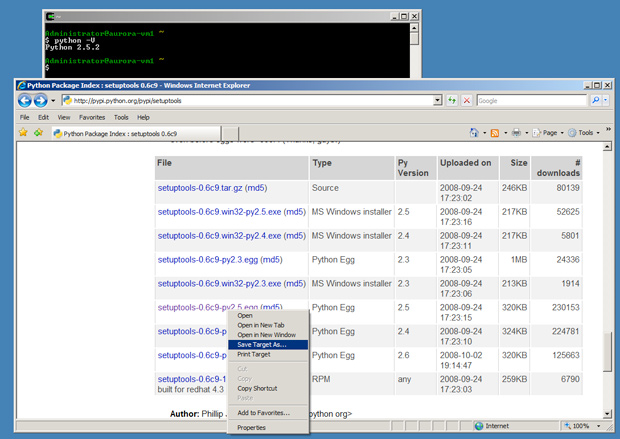
Once the download is finished, we can run the .egg file as if it were a shell script or executable file. Execute the following command (changing the path if you saved the file elsewhere or have a different version):

/cygdrive/c/setuptools-0.6c9-py2.5.egg

This will whizz through quickly and install setuptools for you. Now we're ready for installing gitosis.

Installing Gitosis

Gitosis is installed by cloning its git repository. In your Cygwin Bash window, create a convenient directory and change into it. You can then clone the gitosis repository. Since gitosis is small and lightweight, this will only take moments.

mkdir sources && cd sources
git clone git://eagain.net/gitosis.git

Once the clone is complete, install gitosis with the following commands:

cd gitosis
python setup.py install

A bunch of output will fly past and if all went well, gitosis is now installed.
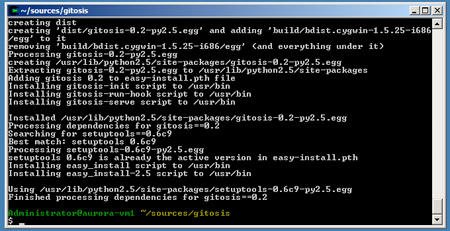
In addition, I encountered permissions problems during my installation, where the git user could not read setuptools and/or gitosis. To save yourself a lot of pain and headaches later, run the following command to allow all users to read all the python code we have just installed: chmod +r /usr/lib/python2.5/ -R

Set It All Up...

The first thing to do now gitosis is installed is to create a user for it. Traditionally this is called 'git', although you can call it whatever you want. Since I am on Windows Server 2003, I cracked open lusrmgr.msc and created my user. Give it any password you like. I also set it to never require or allow a password change.
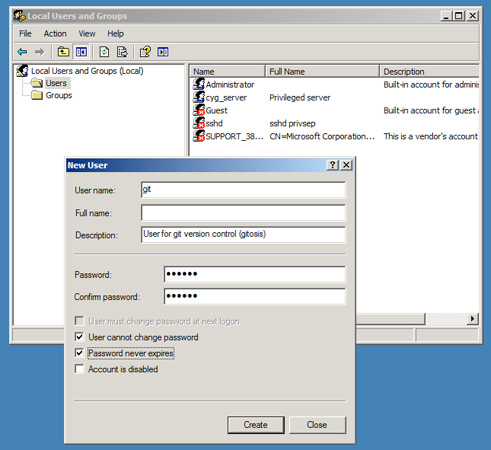
We will also need to enable the git user for use from within cygwin. Run this command in your cygwin bash window: mkpasswd -l -u git >> /etc/passwd

Before continuing, you will need a public SSH key. If you do not have one on your local machine (not the server), generate one. On OSX, Linux, Cygwin and other unix-like OSs, this can be achieved using the ssh-keygen command. If you need more help, see the github guide on providing your key.

Once you have located or generated your public key (make sure its the public one not the private!), copy it over to the server and place it in cygwin's /tmp folder. This is the C:\cygwin\tmp folder. Place the key in there and go back to your cygwin bash window. Allow all users to read the key (in my case, it is called id_rsa.pub) using the following command: chmod 755 /tmp/id_rsa.pub

Now it is time to initialise gitosis in the home directory of the git user we created earlier. Now we need to log in as the git user and initialise gitosis using the key we have copied over. The easiest way to log in as the git user is to use the runas command within Windows to launch a new cygwin window running as the git user.

runas /user:git C:/cygwin/cygwin.bat

A new cygwin bash window will open logged in as the new git user. Within this window, we initialise gitosis using the following command, remembering to substitute your key's filename if it is different:

gitosis-init < /tmp/id_rsa.pub

You should get the following feedback to say it was successful:

Initialized empty Git repository in /home/git/repositories/gitosis-admin.git/
Reinitialized existing Git repository in /home/git/repositories/gitosis-admin.git/

Back in your Administrator user bash window, ensure everyone has permissions on the post-update hook gitosis provides. Apparently sometimes this does not get set correctly (and its always best to avoid headaches like this later).

chmod 755 /home/git/repositories/gitosis-admin.git/hooks/post-update

Using Gitosis

Now that we have gitosis installed and ready to go, we do not need to work on the server anymore. Go back to your own local machine (where your SSH key came from earlier) and clone the gitosis administration repository. This is a particularly cool aspect of gitosis - you manage your gitosis configuration using its own git repository. How recursive!

Before we clone the repository, try a plain SSH connection to the server. This is because we need to accept the server's key first and this only needs to be done once: ssh git@your-server. Accept the key and disregard the error you will receive. That's all you needed. Now the admin repository can be cloned.

git clone git@your-server:gitosis-admin.git

Inside the cloned repository there is a folder named keydir and a config file named gitosis.conf. Adding a new user is as simple as adding their key to the keydir folder. You will also notice that your own key which we initialised gitosis with earlier has automatically been added. Also, the filename will have changed to match the key comment (often this is in the form of user@hostname). To add a new repository, crack open the config file in your favourite text editor. You will see the following:

[group gitosis-admin]
writable = gitosis-admin
members = me@myhost

I added a new group and left the gitosis-admin one intact. A group is a nice easy way of dividing up which users can read/write to what repositories.

[group me-and-my-friends]
members = me@myhost
writable = cool-new-project

More than one user and/or repository can be added to any group section, and there may be multiple group sections. This is particularly useful if you have a team and wish to be broken down into smaller subteams. A quick example:

[group team1]
members = john bob sarah
writable = project1 project2

[group team2]
members = bob tina tom
writable = project3 project 4

Once the keys and config file are added or updated, commit and push the repository back to the server. Gitosis will update its configuration automatically.

The new repositories can be created locally using git init. You can then go about adding all your new files in the usual way and push the repository to the server after adding a new remote (normally called 'origin'):

git remote add origin git@myserver:cool-new-project.git
git push origin master:refs/heads/master

This will create the repository on the server at the given URL and make it available to all those for whom you granted access. Be sure to use the same repository name in the gitosis config file as you do on the URL (with '.git' appended).

There is a lot more which can be done using gitosis, such as allowing repositories to be exposed via the git:// protocol and much more. A lot of this stuff I haven't tried yet since its functionality I haven't needed. See the gitosis readme and example.conf files for more information.

If you notice any errors or omissions in this post, please do comment or message me on twitter and I will try to find the answer or update the post as necessary.

Comments

Thomas's gravatar

Thomas on said:

Hi - Great tutorial.

I was wondering if you can possibly do using the msysgit as well ? I am sure many people would find this helpful.

Cheers

Mark's gravatar

Mark on said:

@Thomas: I'm not sure if this can be done using msysgit, as gitosis requires the use of an SSH server and Bash. I will sure look into it though as I agree - if it can be done it would certainly be useful. However I suspect it may be rather difficult to achieve. Thank you for your comment.

James Cassell's gravatar

James Cassell on said:

This can be done with msysgit. It comes with git-bash, which you'll need to do the inital push to a new remote repository, but after that you can do everything from the gui. (Also, you'll need to use git-bash to do an initial clone of gitosis-admin.)

Andy's gravatar

Andy on said:

Hi James - is there any chance you can write up a tutorial for setting up a GIT server using Msysgit for Windows - would be absolutely fantastic if you could ?

Yorn's gravatar

Yorn on said:

Andy - if you are attempting to setup a msysgit server with windows - then very much suggest that you refer to this post - http://www.timdavis.com.au/git/setting-up-a-msysgit-server-with-copssh-on-windows/ - it helped me. Cheers, Yorn

Thiru's gravatar

Thiru on said:

Thank you so much for this tutorial. It worked flawlessly! I've been trying to get this going for a while now and encountered problems with all other tutorials I've attempted to follow. Great job!

Mike Henke's gravatar

Mike Henke on said:

Is anyone experiencing the gitosis.config to be finicky? I try to add a new repos but i get permissions denied when trying to do the initial commit. I have also found I have to move repos names around sometimes to get permissions to work.

Mike Henke's gravatar

Mike Henke on said:

It seems after committing the gitosis.config and looking @ the debugging information something is being cached since the "x found in x" are not what is in the gitosis.config anymore.

DEBUG:gitosis.serve.main:Got command "git-receive-pack 'gatescert.git'"
DEBUG:gitosis.access.haveAccess:Access check for 'mhenke' as 'writable' on 'gatescert.git'...
DEBUG:gitosis.access.haveAccess:Stripping .git suffix from 'gatescert.git', new value 'gatescert'
DEBUG:gitosis.group.getMembership:found 'mhenke' in 'gitosis-admin'
DEBUG:gitosis.group.getMembership:found 'mhenke' in 'acf_committers'
DEBUG:gitosis.group.getMembership:found '@acf_committers' in 'team3'
DEBUG:gitosis.group.getMembership:found '@acf_committers' in 'team2'
DEBUG:gitosis.group.getMembership:found '@acf_committers' in 'team1'
DEBUG:gitosis.group.getMembership:found '@acf_committers' in 'team5'
DEBUG:gitosis.group.getMembership:found '@acf_committers' in 'team4'

Roman's gravatar

Roman on said:

I got this error when running this line

git@vs1244 ~
$ gitosis-init < /tmp/id_rsa.pub
bash: /usr/bin/gitosis-init: /home/rnarciso/sources/gitosis^M: bad interpreter:
Permission denied

Same thing's gravatar

Same thing on said:

----------------------
I got this error when running this line git@vs1244 ~ $ gitosis-init < /tmp/id_rsa.pub bash: /usr/bin/gitosis-init: /home/rnarciso/sources/gitosis^M: bad interpreter: Permission denied
--------------------
same thing

Mark's gravatar

Mark on said:

@Roman and 'Same thing': this seems to be caused by the first line of the gitosis-init script being given the wrong path. It should read like the following:
#!/path/to/python
but instead it seems to being set to
#!/path/to/your/sources/gitosis
This is clearly wrong, but I don't know why you are experiencing it. I cannot reproduce the problem.

Similar Issue's gravatar

Similar Issue on said:

Actually, I'm getting something similar to this error when trying to push from client machine to the server and then I get a similar error.

bash.exe: warning: could not find /tmp, please create!
hooks/post-update: /c/cygwin/bin/gitosis-run-hook: /usr/bin/python^M: bad interpreter: No such file or directory

Mark's gravatar

Mark on said:

@Similar Issue: yes, this looks to be the same thing. It looks like the post-update hook which runs after you push an update to the server has its interpreter line set to some peculiar location.

I'd love to know what's causing this, but as I say, I'm unable to recreate the issue myself. Following the steps in my post always results in a working installation (even with the latest version of the setuptools egg and so on).

@Similar Issue:'s gravatar

@Similar Issue: on said:

Thanks, at this point, I'm giving up on it. I've spent way too much time trying to figure out what's causing the flaky behavior with cgywin. The only other option is to run linux. (blah!). Back to svn for me, at least that works on a window server pretty well and straight forward.

Mark's gravatar

Mark on said:

An alternative to my approach which may be worth trying out is to use copSSH and msysgit to cobble together a working gitosis server. Tim Davis has written a post on his experiences here: http://www.timdavis.com.au/git/setting-up-a-msysgit-server-with-copssh-on-windows/ . Might be helpful to some, but be warned - it is not a quick procedure to go through.

Chris Kolenko's gravatar

Chris Kolenko on said:

After a few tries I've finally got it :D

Everyone please read the runat /user:git carefully :D

Tom's gravatar

Tom on said:

Have been making my way through this tutorial with some success. However, when it comes to making a connection to the server (which is in a datacenter with some fairly locked down network settings), my local development PC is unable to connect and clone the gitosis-admin repository.

I've opened and forwarded port 9418, but to no avail. SSH connects fine on port 22. Any ideas? Which port should Git be using, if not 9418? Also, I'm a little sceptical of the ability of Gitosis to respond to incoming requests if it's not running some sort of daemon... Is there anything that I should check is running?

Tom's gravatar

Tom on said:

/headinhands.gif

To answer my own question(s) - I was attempting to clone using a git:// URI, rather than the git@server:repo.git syntax. And with the daemon thing, I believe it runs through the SSH daemon somehow.

Mark's gravatar

Mark on said:

@Tom: yup, you are spot on. Following this tutorial should give you a server which provides access to git over SSH. I have not looked into getting git:// support enabled (or indeed whether gitosis supports it, although I suspect it must do) since I favour the SSH approach (built-in security, authentication & one less open port).
<br /><br />In terms of running services, as long as SSH is running and available, gitosis should be too since it is just a set of python scripts which sit behind SSH for the git user.

Mike Henke's gravatar

Mike Henke on said:

I am getting the bad interpreter error also and it seems to be related to this. <a href="http://forums.devshed.com/python-programming-11/bad-interpreter-no-such-file-or-directory-379366.html">http://forums.devshed.com/python-programming-11/bad-interpreter-no-such-file-or-directory-379366.html</a>

Any one have a walk through on how to fix it for this case?

Mark's gravatar

Mark on said:

@Mike: nice find, I didn't know shebang lines were so finicky. I guess the question is why some people seem to be ending up with Windows line endings. Within a Cygwin environment, assuming the cygwin version of git (and python?) are used, I would not expect any "Windowsisms".

mike henke's gravatar

mike henke on said:

tr -d '\r' < gitosis-run-hook > gitosis-run-hook

ran in the bin folder

fixed the ^M error. I think a reboot will fix "bash.exe: warning: could not find /tmp, please create!" will find out tomorrow :-)

David Wynne's gravatar

David Wynne on said:

First of all - thanks for such a great guide. I'm so nearly up and running I can feel it!

I've done everything in the guide to the point of cloning the gitosis-admin repro - so I have that locally. I'm now trying to make a change to gitosis.conf and push that back to the server.

Steps:
Make change to gitosis.conf (add new group or whatever)
Commit to local repro
push to origin (using Tortoise Git)
At this point I see the following output:

git.exe push "origin" master:master

Counting objects: 9, done.
Compressing objects: 100% (5/5)
Writing objects: 100% (5/5)
Writing objects: 100% (5/5), 487 bytes, done.
hooks/post-update: line 2: set: -
: invalid option
set: usage: set [--abefhkmnptuvxBCHP] [-o option] [arg ...]
To git@mymachine:gitosis-admin.git
e2cd43a..04c15ce master -> master
Success

Looks like I'm getting an error on hooks/post-update: line 2: set: -

If I go onto the server and check the contents of /home/git/repositories/gitosis-admin.git/gitosis.conf it does not appear to contain the updated changes. I also get the following error if I try and push a new repo (that I had tried to add to the gitosis.conf)

ERROR:gitosis.serve.main:Repository read access denied
fatal: The remote end hung up unexpectedly

I suspect the issue resides with the post hook no executing properly. I've double check the perms and re-run chmod 755 /home/git/repositories/gitosis-admin.git/hooks/post-update to no avail.

Any ideas welcome!
Thanks in advance.

David Wynne's gravatar

David Wynne on said:

Thanks for getting back to me on Twitter. In answer to your question, I can't physically access the file in Windows. If I try and access repositories/gitosis-admin.git in Windows Explorer I get told I don't have perms to access it. I can access it via a cygwin shell however and if I run a cat on the file I see the following:
$ cat post-update
#!/bin/sh
set -e
gitosis-run-hook post-update
git-update-server-info

Doesn't look especially odd, but obviously can't check line endings.

Incidentally I've tried setting this up now on both my Win 7 x64 machine and my Win XP x86 machine both with identical results.

David Wynne's gravatar

David Wynne on said:

Ok sorted it - you were right, it was a line endings issue. As per <a href="http://sandesh247.com/journal/2009/03/on-git-gitosis-and-python-issues-on-windows-vista">http://sandesh247.com/journal/2009/03/on-git-gitosis-and-python-issues-on-windows-vista</a>

Running dos2unix /cygdrive/c/cygwin/home/git/repositories/gitosis-admin.git/hooks/post-update solved the issue! Thanks for your help!

Mark Embling's gravatar

Mark Embling on said:

Excellent, glad you got it working. Its well worth keeping an eye on line ending issues if problems pop up :)

louis's gravatar

louis on said:

To those who wants a MSysGit way, maybe this is helpful.
<a href="http://java2cs2.blogspot.com/2010/03/setup-git-server-on-windows-machine.html">http://java2cs2.blogspot.com/2010/03/setup-git-server-on-windows-machine.html</a>

Ralf Detzler's gravatar

Ralf Detzler on said:

Thank you very much for this excellent tutorial. It worked for me without any changes at the first run on Windows XP client and server.

Henry Suryawirawan's gravatar

Henry Suryawirawan on said:

Hi,
I've got this problem when trying to clone existing repository or pushing new repository to the server.
I've tried all the above solutions, but with no success.

Here is the debug log from gitosis:
Microsoft Windows XP [Version 5.1.2600]
(C) Copyright 1985-2001 Microsoft Corp.

C:\Documents\Git\abc>git push origin master:refs/heads/master
Enter passphrase for key '/c/Documents and Settings/admin/.ssh/id_rsa':
DEBUG:gitosis.serve.main:Got command "git-receive-pack '/home/git/repositories/a
bc.git'"
DEBUG:gitosis.access.haveAccess:Access check for 'henry' as 'writable' on 'home/
git/repositories/abc.git'...
DEBUG:gitosis.access.haveAccess:Stripping .git suffix from 'home/git/repositorie
s/abc.git', new value 'home/git/repositories/abc'
DEBUG:gitosis.group.getMembership:found 'henry' in 'testing'
DEBUG:gitosis.group.getMembership:found 'henry' in 'abc-team'
DEBUG:gitosis.access.haveAccess:Access check for 'henry' as 'writeable' on 'home
/git/repositories/abc.git'...
DEBUG:gitosis.access.haveAccess:Stripping .git suffix from 'home/git/repositorie
s/abc.git', new value 'home/git/repositories/abc'
DEBUG:gitosis.group.getMembership:found 'henry' in 'testing'
DEBUG:gitosis.group.getMembership:found 'henry' in 'abc-team'
DEBUG:gitosis.access.haveAccess:Access check for 'henry' as 'readonly' on 'home/
git/repositories/abc.git'...
DEBUG:gitosis.access.haveAccess:Stripping .git suffix from 'home/git/repositorie
s/abc.git', new value 'home/git/repositories/abc'
DEBUG:gitosis.group.getMembership:found 'henry' in 'testing'
DEBUG:gitosis.group.getMembership:found 'henry' in 'abc-team'
ERROR:gitosis.serve.main:Repository read access denied
fatal: The remote end hung up unexpectedly

The debug log is not so friendly :(
Can anyone help me?

cao7113's gravatar

cao7113 on said:

Great work done! Thanks much!

Noel  Kennedy's gravatar

Noel Kennedy on said:

great, thanks for the guide. I had two problems which im writing up here with their fix:

1.
I had a Windows moment when doing my initial connection. When challenged for the SSH remote login password, I kept typing in the passphrase I had used to create the rsa key. (woops), the password is the one you gave for the git windows account on the server

2.
I then had problems doing the initial clone to my local pc using this command:
git clone git@servername:gitosis-admin.git
I kept getting 'gitosis-admin.get does not appear to be a git repository'

I eventually got it working with
git clone git@servername:/home/git/repositories/gitosis-admin.git

Hope this saves someone else some time!

Sebastien's gravatar

Sebastien on said:

I'm stuck there.

$ gitosis-init < id_rsa.pub
2 [main] python 66492 C:\cygwin\bin\python.exe: *** fatal error - unable t
o remap \\?\C:\cygwin\lib\python2.6\lib-dynload\time.dll to same address as pare
nt: 0x360000 != 0x380000
2 [main] python 30908 fork: child 66492 - died waiting for dll loading, er
rno 11
Traceback (most recent call last):
File "/usr/bin/gitosis-init", line 8, in <module>
load_entry_point('gitosis==0.2', 'console_scripts', 'gitosis-init')()
File "/usr/lib/python2.6/site-packages/gitosis-0.2-py2.6.egg/gitosis/app.py",
line 24, in run
return app.main()
File "/usr/lib/python2.6/site-packages/gitosis-0.2-py2.6.egg/gitosis/app.py",
line 38, in main
self.handle_args(parser, cfg, options, args)
File "/usr/lib/python2.6/site-packages/gitosis-0.2-py2.6.egg/gitosis/init.py",
line 136, in handle_args
user=user,
File "/usr/lib/python2.6/site-packages/gitosis-0.2-py2.6.egg/gitosis/init.py",
line 75, in init_admin_repository
template=resource_filename('gitosis.templates', 'admin')
File "/usr/lib/python2.6/site-packages/gitosis-0.2-py2.6.egg/gitosis/repositor
y.py", line 51, in init
close_fds=True,
File "/usr/lib/python2.6/subprocess.py", line 480, in call
return Popen(*popenargs, **kwargs).wait()
File "/usr/lib/python2.6/subprocess.py", line 633, in __init__
errread, errwrite)
File "/usr/lib/python2.6/subprocess.py", line 1049, in _execute_child
self.pid = os.fork()
OSError: [Errno 11] Resource temporarily unavailable

Karlo Espiritu's gravatar

Karlo Espiritu on said:

Tried the steps above, but I'm also stuck with the same errors that @Sebastien got. C:\cygwin\bin\python.exe: *** fatal error - unable to remap \\?\C:\cygwin\lib\python.2.6\lib-dynload\time.dll to same address as parent: 0x360000 != 0x410000

Please help. Thanks in advanced!

Rei Roldan's gravatar

Rei Roldan on said:

@Karlo you probably missed:

chmod +r /usr/lib/python2.5/ -R

or

chmod +r /usr/lib/python2.6/ -R (earlier versions of python)

from the admin bash

Sebastien's gravatar

Sebastien on said:

guys. I found out how to fix my problems. I wrote a guide how to install gitosis on windows 7. Took me a while to complete it. I hope that will help you too

<a href="http://jerabi.com/sdionne/blog/2010/09/06/git-repository-server-gitosis-on-win7-working/">http://jerabi.com/sdionne/blog/2010/09/06/git-repository-server-gitosis-on-win7-working/</a>

Nagendra's gravatar

Nagendra on said:

Hi, i am struggling a lot to install a server and client git in Windows Server 2003 64-bit . Please help me and suggest the requirements the git server and client successfully.

Mark Embling's gravatar

Mark Embling on said:

@Nagendra: your question is very vague. What exactly is going wrong for you? For the client, using MSysGit works superbly. For the server, this post describes setting it up on Windows Server 2003. Another approach is to use the HTTP protocol instead of SSH (like I have here) and use an approach like Jeremy has discussed: <a href="http://www.jeremyskinner.co.uk/2010/07/31/hosting-a-git-server-under-apache-on-windows/">http://www.jeremyskinner.co.uk/2010/07/31/hosting-a-git-server-under-apache-on-windows/</a>

saran's gravatar

saran on said:

Hi Ralf Detzler

Could you please advice or provide me the setup, which you done it in Win xp.

kward's gravatar

kward on said:

@David Wynne: I also ran into line ending issues. But the problem was on my local machine, not the server. When I pushing up the changes I received errors. I have to set 'autocrlf' to false in my git config file. fixed all the line ending issues

maryoioj's gravatar

maryoioj on said:

evidence based medicine in pediatrics <a href="http://www.youtube.com/watch?v=HJOlPY5gqY8#058">http://www.youtube.com/watch?v=HJOlPY5gqY8#058</a> - order modafinil no prescription rx travel medicine clinic pennsylvania
pharmacy downtown salt lake city <a href="http://www.youtube.com/watch?v=fIVm5HaD6eI#455">http://www.youtube.com/watch?v=fIVm5HaD6eI#455</a> - order provigil from mexico cvs pharmacy providence orlando fl
history of medicine in latin america <a href="http://www.youtube.com/watch?v=wUnuwGS13sc#051">http://www.youtube.com/watch?v=wUnuwGS13sc#051</a> - lamictal provigil combination lakepoint internal medicine
can dermatologist sell prescription medicine <a href="http://www.youtube.com/watch?v=iV9BrkJ-O9I#854">http://www.youtube.com/watch?v=iV9BrkJ-O9I#854</a> - provigil and alcohol review community medical pharmacy chula vista
siemens nuclear medicine <a href="http://www.youtube.com/watch?v=A5UdTpemdvk#147">http://www.youtube.com/watch?v=A5UdTpemdvk#147</a> - cost of provigil weight loss medicine for flying anxiety
ancient rome raisins medicine currency prize <a href="http://www.youtube.com/watch?v=LSq4SauHjzE#296">http://www.youtube.com/watch?v=LSq4SauHjzE#296</a> - provigil online drug dr matthew grady sports medicine
estro medicine <a href="http://www.youtube.com/watch?v=eVMobF6_Gi0#535">http://www.youtube.com/watch?v=eVMobF6_Gi0#535</a> - cheap generic provigil online online pharmacies aviane or alesse
park city utah pharmacy <a href="http://www.youtube.com/watch?v=Hywu--CHUv0#185">http://www.youtube.com/watch?v=Hywu--CHUv0#185</a> - kaufen online provigil pregnancy and cough medicines
internal medicine intake sheet <a href="http://www.youtube.com/watch?v=nMvaaLFVzf0#199">http://www.youtube.com/watch?v=nMvaaLFVzf0#199</a> - provigil depression medication anti snoring medicine
community pharmacy maine <a href="http://www.youtube.com/watch?v=a5A9RSn-Zzw#334">http://www.youtube.com/watch?v=a5A9RSn-Zzw#334</a> - sort provigil online no prescription pittsburg ks pharmacies
post tretment acne medicine <a href=<a href="http://www.youtube.com/watch?v=HJOlPY5gqY8#237">http://www.youtube.com/watch?v=HJOlPY5gqY8#237</a> - modafinil provigil order </a> soderlund pharmacy museum admission
sodium perborate pharmacy gum disease <a href=<a href="http://www.youtube.com/watch?v=fIVm5HaD6eI#021">http://www.youtube.com/watch?v=fIVm5HaD6eI#021</a> - best way to order provigil online </a> hopkins travel medicine
candian college of naturopathic medicine <a href=<a href="http://www.youtube.com/watch?v=wUnuwGS13sc#006">http://www.youtube.com/watch?v=wUnuwGS13sc#006</a> - is provigil a sedative </a> walgreens pharmacy denham springs
popular medicine <a href=<a href="http://www.youtube.com/watch?v=iV9BrkJ-O9I#609">http://www.youtube.com/watch?v=iV9BrkJ-O9I#609</a> - provigil and alcohol 2014 </a> swedish degrees in medicine
psychology psychic medicine <a href=<a href="http://www.youtube.com/watch?v=A5UdTpemdvk#838">http://www.youtube.com/watch?v=A5UdTpemdvk#838</a> - cost of buy provigil </a> renal cellcarcinoma e medicine
arthritis chinese medicine rheumatoid <a href=<a href="http://www.youtube.com/watch?v=LSq4SauHjzE#719">http://www.youtube.com/watch?v=LSq4SauHjzE#719</a> - natural provigil drug </a> medicine in the middle ages
no faith in medicine <a href=<a href="http://www.youtube.com/watch?v=eVMobF6_Gi0#847">http://www.youtube.com/watch?v=eVMobF6_Gi0#847</a> - generic provigil online per pill </a> bill griggs medicine prince alfred college
medicines for dogs with coughs <a href=<a href="http://www.youtube.com/watch?v=Hywu--CHUv0#408">http://www.youtube.com/watch?v=Hywu--CHUv0#408</a> - provigil kaufen generic </a> online british pharmacy
case medicine nuclear study <a href=<a href="http://www.youtube.com/watch?v=nMvaaLFVzf0#573">http://www.youtube.com/watch?v=nMvaaLFVzf0#573</a> - provigil fibromyalgia medication </a> pacifica pharmacy torrence
pharmacy border clip art <a href=<a href="http://www.youtube.com/watch?v=a5A9RSn-Zzw#138">http://www.youtube.com/watch?v=a5A9RSn-Zzw#138</a> - provigil online no prescription </a> accident and emergemcy medicine

extensite's gravatar

extensite on said:

Hi,

Thanks for this tutorial.
But,I have an Error durig the gitosis installation.

python setup.py install

Traceback (most recent call last):
File "setup.py", line 54, in <module>
'gitosis.templates': subdir_contents('gitosis/templates'),
File "setup.py", line 17, in subdir_contents
return list(_subdir_contents(path))
File "setup.py", line 14, in _subdir_contents
raise RuntimeError()
RuntimeError

Can you help me ? Thanks

facebook fans's gravatar

facebook fans on said:

Simply desire to say your article is as astounding.
The clearness in your post is simply cool and i could assume you're an expert on this subject. Fine with your permission let me to grab your feed to keep updated with forthcoming post. Thanks a million and please keep up the enjoyable work.

Fadhel's gravatar

Fadhel on said:

I would like to thank you for this great tutorial. It was totally helpful.

Thanks again.

Fadhel

Lourdes Satheesh's gravatar

Lourdes Satheesh on said:

I am getting this error. Please help.

git@ETI-Web ~
$ gitosis-init < /tmp/id_rsa.pub
Traceback (most recent call last):
File "/usr/bin/gitosis-init", line 5, in <module>
from pkg_resources import load_entry_point
ImportError: No module named pkg_resources

Saul's gravatar

Saul on said:

magnificent put up, very informative. I ponder why the opposite specialists of this sector don't realize this. You must proceed your writing. I am confident, you've a
huge readers' base already!

Add Comment (required)

(required, never published)


(required)

Return to blog